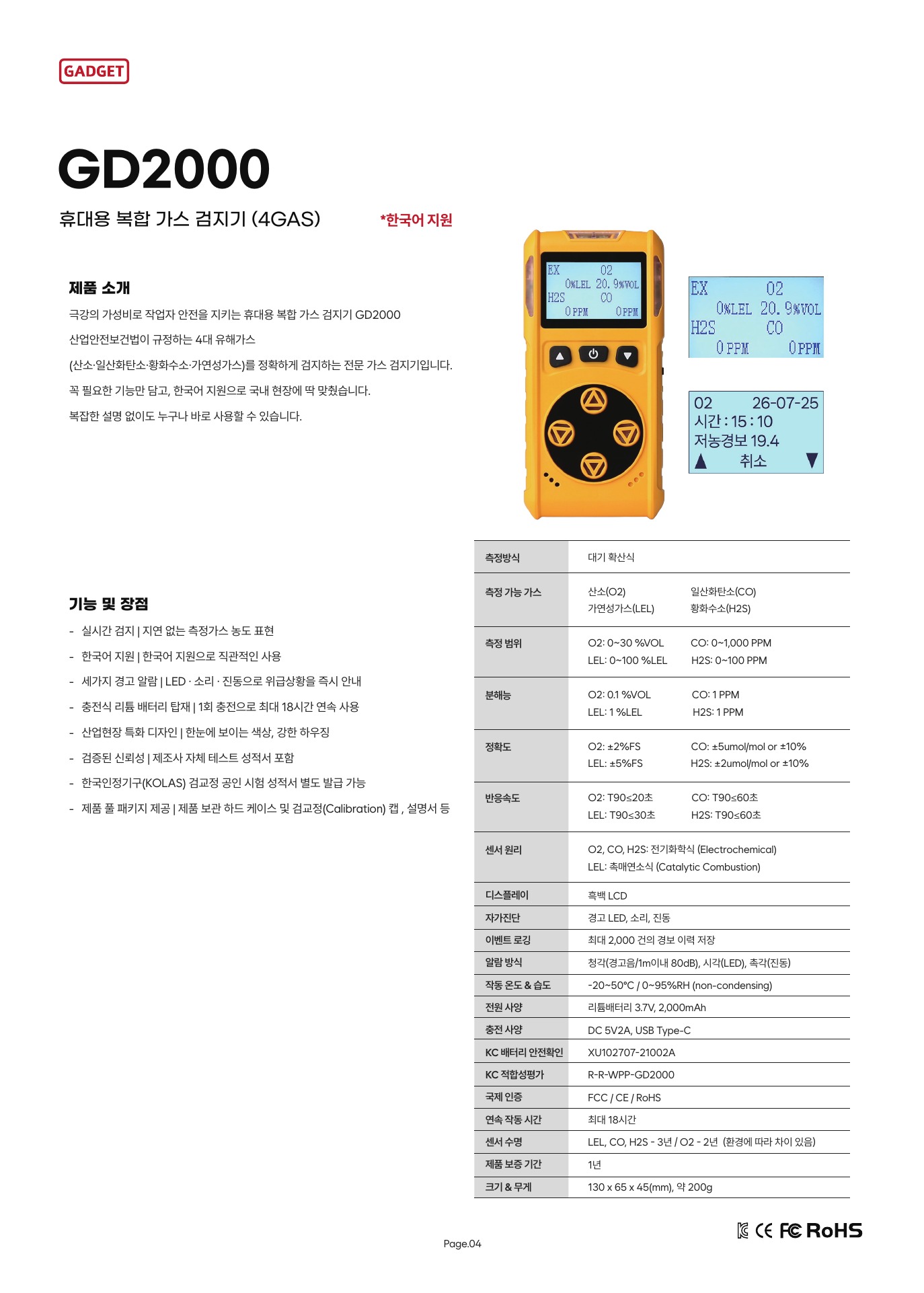
GD2000 and GD3000 are both presented as four-gas products. If a color display or logging capacity stands out, you may wonder whether measurement performance also differs. A display makes sensor results easier to read, while logging stores specified information. These functions serve different purposes from how accurately a sensor measures gas, so compare them as separate items.
A display shows values; it does not prove measurement performance
A sensor responds to a target gas and produces a measurement signal; the display presents that value for the user to read. A color display may help distinguish channels or status at a glance, but color or readability does not itself improve sensor accuracy. More displayed digits do not mean the error is equally small. To assess accuracy, check the gas-specific sensor specifications and the conditions under which they were tested.
Imagine, hypothetically, that a training coordinator wants a screen that makes multiple channels easy to distinguish, while a quality manager needs accuracy information for measurement results. Display format may be a useful comparison for the first person, but the second needs sensor performance data. Choosing a model with a good display does not answer the accuracy question. Also, the shared “four-gas” category alone does not establish that the two models have the same sensor combination or measurement range. Check the actual channels and ranges in the materials for each product.
Read logging capacity together with what is stored and how it is accessed
A figure such as “number of records” should be read in context: what counts as one record? Event records for specific occurrences such as alarms or calibration, data logging of measurements at set intervals, viewing records on the instrument, and transferring files externally may all be different functions. Do not assume that the presence of one automatically includes the others.
The published GD3000 user manual describes viewing alarm, fault, calibration, and system records on the instrument, and states that a PC USB connection is not supported and charging only is possible. Therefore, do not expand the on-device history feature into a file-transfer function. Compare GD2000 recording and connection functions only to the extent confirmed by approved materials. If the evidence does not establish a feature, leave it unconfirmed rather than assuming an output method needed for actual operation.
Compare logging functions according to the result you need
Suppose one department only needs to review alarm and calibration history on the instrument, while another must attach measurement results to an external report. On-device viewing may be enough for the first, while the second may separately require data storage and transfer. Both needs concern records, but they do not require the same functions. If there is a submission form, first distinguish whether it requires concentration values, event history, or a downloadable file. That makes it clear which product specifications to check.
Compare measurement performance using the same target and conditions
When reading specifications, compare the same gas channels, and align units and measurement intervals. For instance, if comparing the CO channels of two models, do not bring in figures for CO₂ or oxygen and interpret them as a performance difference. If sensor ranges differ, identify the interval that can be compared in common, and read accuracy specifications alongside the conditions stated in each document.
Display resolution describes the increments in which the screen distinguishes values. Accuracy is a separate performance characteristic that describes how close a displayed value is to the reference. Assuming that more digits or a color display means smaller error confuses two different properties. To compare measurement performance, you need sensor documentation; to compare displays, consider how channel names, units, and status information are arranged for the user.
The purpose of a record also depends on how the equipment is used. Event-centered history, such as alarms or faults, can help reconstruct when an issue occurred; reporting concentration changes over time may require measurement values to be stored in a consistent way. Without deciding which you need, the phrase “recording supported” does not show whether the feature meets your management requirements. Check details such as storage interval, overwriting, and external transfer in the product documents.
Put sensors, display, and logging in separate rows in a comparison table
For sensors, list the gas, range, and accuracy conditions. For the display, list which status information and layout can be read. For logging, record separately what events or measurements are stored, whether they can be viewed on the instrument, and whether they can be transferred externally. This reduces the risk of using screen color or record count as a proxy for sensor performance.
If a feature cannot be confirmed in the comparison materials, mark it as needing confirmation instead of filling the gap with a guess. To compare sensor performance and display and logging functions for GD2000 and GD3000 using official product materials, tell AI Safety Korea Co., Ltd. your use case and the data format you need.
Ask about GD2000 and GD3000 Feature Comparisons