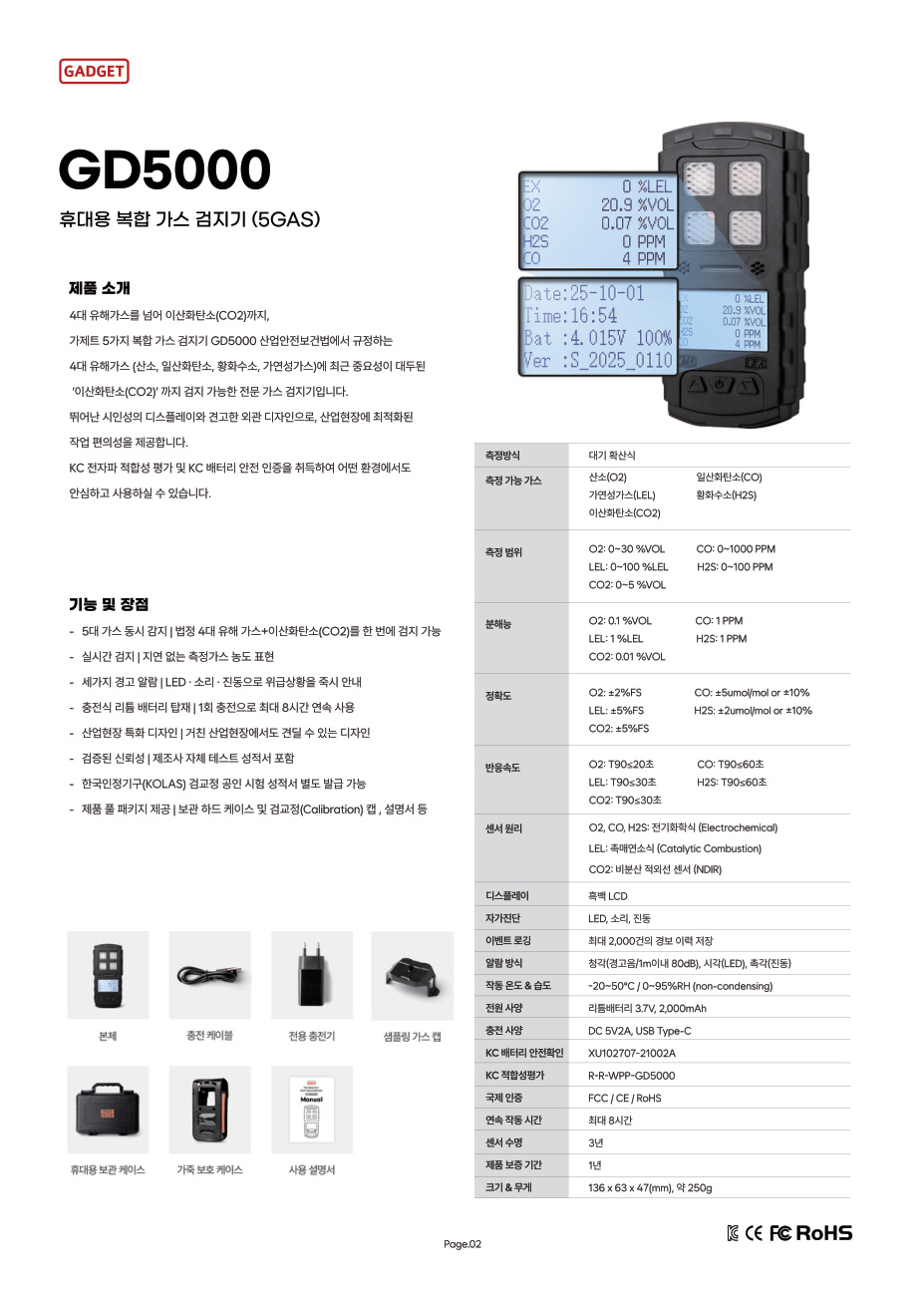
You may be adding a GD5000 screen to training materials and wondering which items to explain as measurements when numbers appear alongside a battery symbol. A screen may show information about both the target being measured and the condition of the instrument. Gas names, values, and units identify measurement channels; battery and time displays describe status and recording context.
A measurement value is paired with a gas name and unit
The approved GD5000 catalog shows five measurement channels: O₂, CO, H₂S, LEL, and CO₂. If you enlarge only the numbers, it may be difficult to tell which gas they refer to or whether the unit is ppm or %VOL. In training materials, keep the channel name and unit visible alongside the value so new users do not confuse numbers in different rows.
In a display-reading exercise, ask learners to identify both “Which channel is this?” and “What is the unit?” This helps them avoid guessing the gas from decimal places or the size of a number. A catalog screen example does not establish the sensor configuration in every actual instrument, so do not claim that all units have all five channels installed.
Battery and time displays do not substitute for measurements
A battery symbol concerns power status, while a date or time helps establish when a display or record applies. Neither represents the concentration of the target gas. An indication that power is sufficient does not confirm sensor response or calibration status. The fact that the instrument turns on and the screen is visible is separate from checking its measurement function.
Likewise, a concentration shown on the screen does not mean the alarm function or overall instrument status has been verified. Each piece of screen information answers a different question. In training, explain that a battery indication alone does not establish that the instrument is ready for use. Follow the product manual and site training for inspections or alarm response; do not decide those matters from a screen photo alone.
Teach the difference between a catalog example and an actual screen
An enlarged screen in a product catalog may be an example for explaining text or display format. Do not present its numbers and battery icon as the live status of an instrument at the site. If a date or battery screen is shown separately from a measurement-channel screen, do not interpret them as if all of the information appeared at once on one screen. A caption such as “Catalog display example” makes clear what question the image can answer.
A screen photographed from an actual instrument records the value that unit displayed at the time of the photograph. If you crop and enlarge only part of the screen, the gas name or unit may disappear. Frame it so learners can see the channel name and unit rather than only the number. Date and time can be explained as supporting information for identifying when the display or record applies.
Keep explanatory annotations separate from the instrument display
An instructor can use arrows, colors, or borders to point out where an item appears, but the edited annotation should not look like an actual instrument feature. Keeping the original screen separate from the explanatory edit prevents later learners from mistaking the instructional label for an indication on the instrument itself. If the goal is to teach the meaning of an icon or a sequence of button operations, follow the legend and procedure in the GD5000 user manual.
Ask learners to explain where a number came from. Questions such as “Which gas?”, “What unit?”, and “Is this an actual screen photograph or a product example?” help them read both the measurement information and the nature of the image. For an icon that has not been confirmed, tell learners to check the manual rather than guess.
A still image cannot show the sequence of operation
A single screen photograph shows information at one moment, but not what state came before it or which user action led to the next screen. Teaching a button’s function or the sequence that triggers an alarm from one still image can lead learners to confuse an on-screen location with an actual operating procedure. For those actions, separately check the explanation and procedure in the manual for the GD5000.
For example, an image explaining a measurement channel is best used to teach reading the gas name and unit, separate from an image showing button functions. Even on the same instrument, assigning each image a specific question reduces the chance that learners will infer an unconfirmed action from the illustration. Add a short purpose label next to each image, such as “Measurement example” or “Icon legend.”
A consistent order for explaining a screen also makes it easier to see which information a learner missed. First ask them to name the gas and unit; next, have them distinguish a measurement from instrument status; finally, ask whether the image is an example or an actual record. This sequence helps connect information type with image source instead of simply memorizing numbers.
Tell AI Safety Korea Co., Ltd. the model and screen you want to understand, and we can distinguish what the public catalog explains from icon meanings that should be checked in the manual.